> ## Documentation Index
> Fetch the complete documentation index at: https://docs.neopal.ai/llms.txt
> Use this file to discover all available pages before exploring further.
# Contacts
> The Contacts page stores all customer profiles that have been identified through their email, phone number, or messaging accounts (such as social media platforms). It gives you a centralized view of all your customer data for effective communication, segmentation, and automation.
### Contacts list
Any customer who shares their **email**, **phone number**, or logs in via a **chat/messaging platform** is automatically added to your contact list.
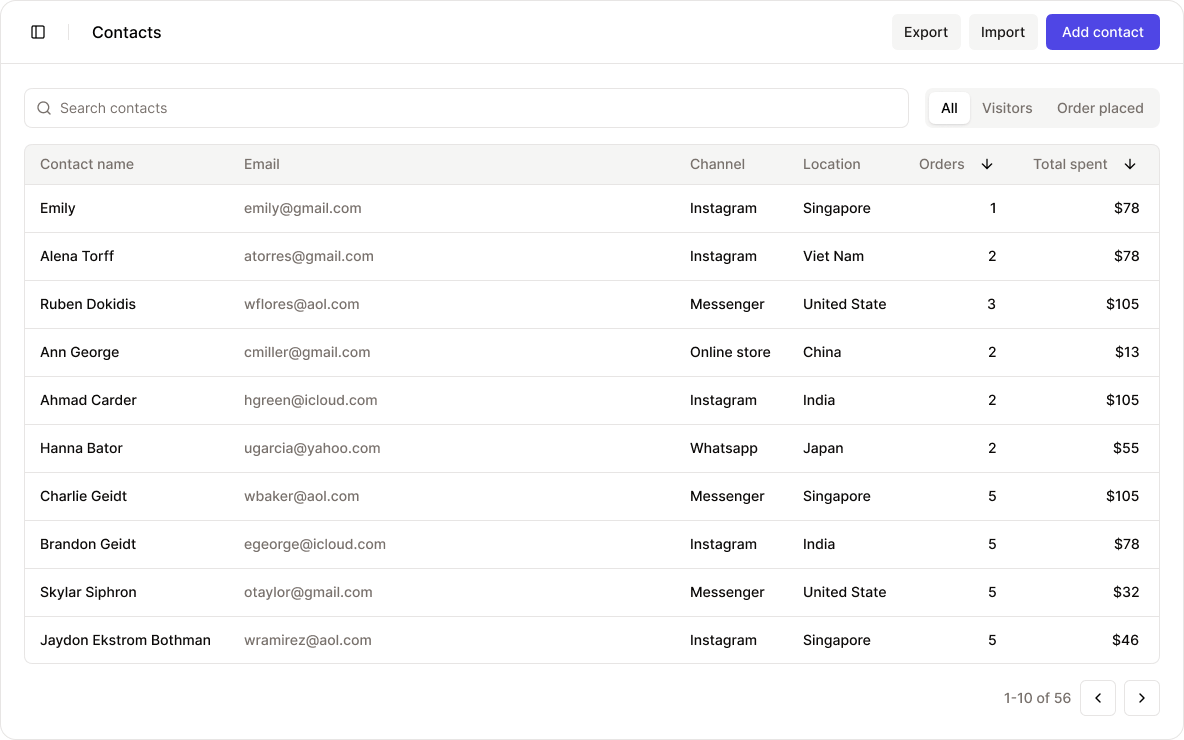 You can also add new contacts manually by clicking **Add Contact**, or upload multiple contacts at once by clicking **Import Contact** and uploading a CSV file (you can export this list from tools like Klaviyo, Mailchimp, or other marketing campaigns).
Use the **search bar** above the table to find contacts by keywords like name, email, phone, address, etc.
You can also filter by contact status:
* **Visitors only** (those who browsed but haven’t purchased)
* **Order placed** (those who have completed a purchase)
You can export contacts info by clicking the **Export** button in the header bar of the contact page.
This allows you to download and back up your contact list for reporting, analysis, or integration with other tools.
### Contact details
Clicking on a contact opens a detailed view where you can review customer insights and take action.
You can also add new contacts manually by clicking **Add Contact**, or upload multiple contacts at once by clicking **Import Contact** and uploading a CSV file (you can export this list from tools like Klaviyo, Mailchimp, or other marketing campaigns).
Use the **search bar** above the table to find contacts by keywords like name, email, phone, address, etc.
You can also filter by contact status:
* **Visitors only** (those who browsed but haven’t purchased)
* **Order placed** (those who have completed a purchase)
You can export contacts info by clicking the **Export** button in the header bar of the contact page.
This allows you to download and back up your contact list for reporting, analysis, or integration with other tools.
### Contact details
Clicking on a contact opens a detailed view where you can review customer insights and take action.
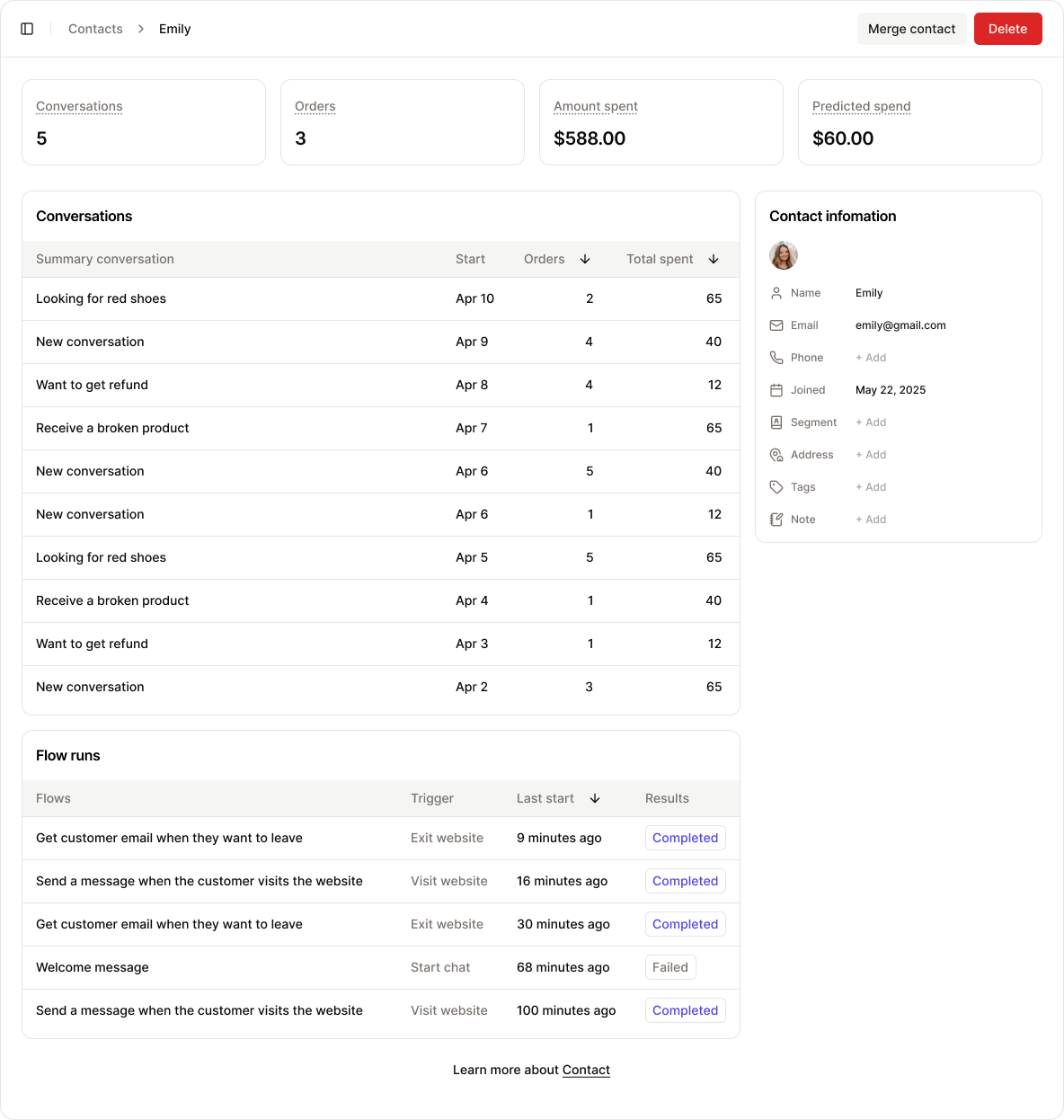 You can delete a contact by clicking the **Delete** button in the header bar.
Deleting a contact **does not** remove associated conversations or automation flows. Those records will remain in the system for reference and tracking purposes.
You can **merge this contact** with another one by using the **Merge contact** button in the header bar.
Merging contacts is helpful for **cleaning up duplicate records** and keeping your customer data organized. This ensures you have a single, unified profile for each customer, making it easier to manage and access relevant information efficiently.
#### **Key metrics**
These key performance indicators are tracked from the moment the contact is identified:
You can delete a contact by clicking the **Delete** button in the header bar.
Deleting a contact **does not** remove associated conversations or automation flows. Those records will remain in the system for reference and tracking purposes.
You can **merge this contact** with another one by using the **Merge contact** button in the header bar.
Merging contacts is helpful for **cleaning up duplicate records** and keeping your customer data organized. This ensures you have a single, unified profile for each customer, making it easier to manage and access relevant information efficiently.
#### **Key metrics**
These key performance indicators are tracked from the moment the contact is identified:
 * **Conversations**: Total number of conversations with this customer
* **Orders**: Total number of orders placed through AI assistance
* **Amount spent**: Total amount spent by the customer
* **Predicted spend**: Estimated upcoming spending based on behavior and AI prediction
#### Contact information
This section displays general customer data collected through chats, order history, or manual entry:
* **Conversations**: Total number of conversations with this customer
* **Orders**: Total number of orders placed through AI assistance
* **Amount spent**: Total amount spent by the customer
* **Predicted spend**: Estimated upcoming spending based on behavior and AI prediction
#### Contact information
This section displays general customer data collected through chats, order history, or manual entry:
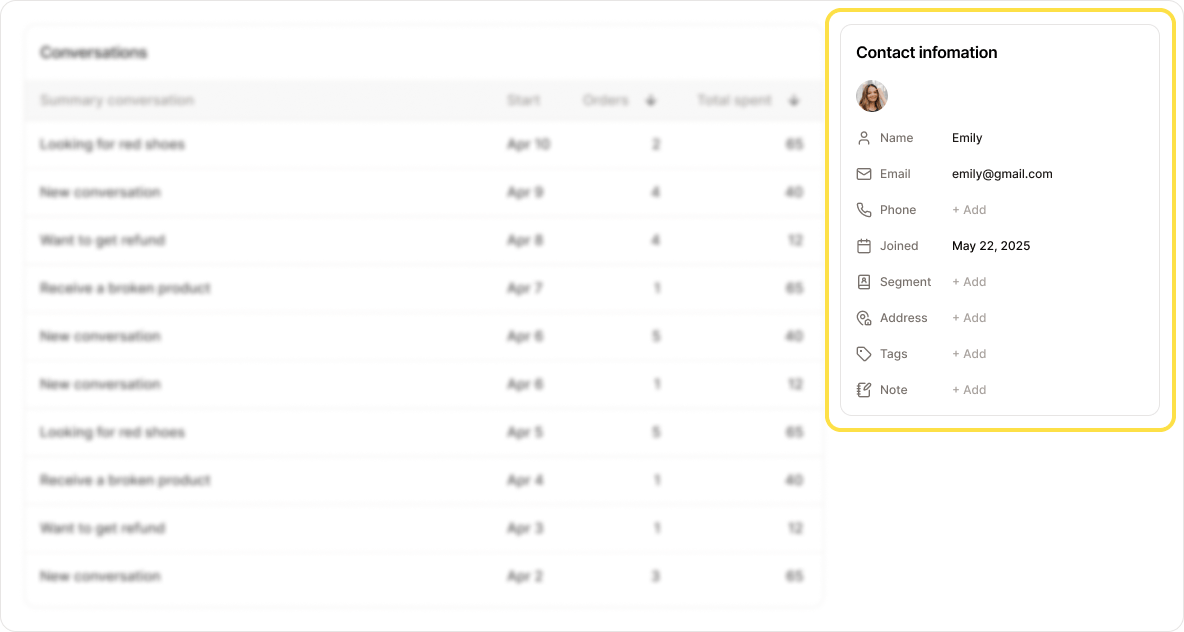 * **Name**
* **Email**
* **Phone**
* **Joined**: Date and time the customer started their first conversation
* **Segment**: Customer group (can be manually assigned or AI-suggested)
* **Address**
* **Tags**: Custom labels to help organize or classify customers
* **Notes**: Internal notes added manually or by Neo AI
> **Note:** These fields are tied to an **identified contact**.
> This differs from **session-based data** found in the Inbox, which may come from unrecognized visitors.
### Conversations
This section lists all conversations associated with the contact since their identity was established.
* **Name**
* **Email**
* **Phone**
* **Joined**: Date and time the customer started their first conversation
* **Segment**: Customer group (can be manually assigned or AI-suggested)
* **Address**
* **Tags**: Custom labels to help organize or classify customers
* **Notes**: Internal notes added manually or by Neo AI
> **Note:** These fields are tied to an **identified contact**.
> This differs from **session-based data** found in the Inbox, which may come from unrecognized visitors.
### Conversations
This section lists all conversations associated with the contact since their identity was established.
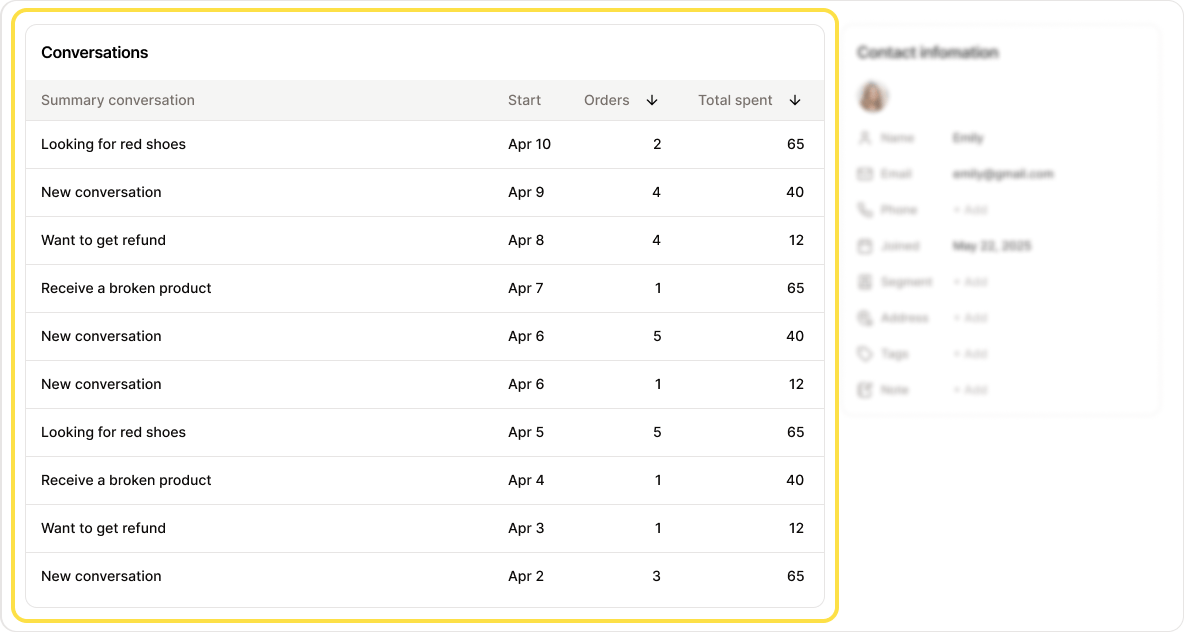 You can click on each conversation to view its full history and context.
### Flow runs
This section shows all **automation flows** that have been executed for this customer.
You can click on each conversation to view its full history and context.
### Flow runs
This section shows all **automation flows** that have been executed for this customer.
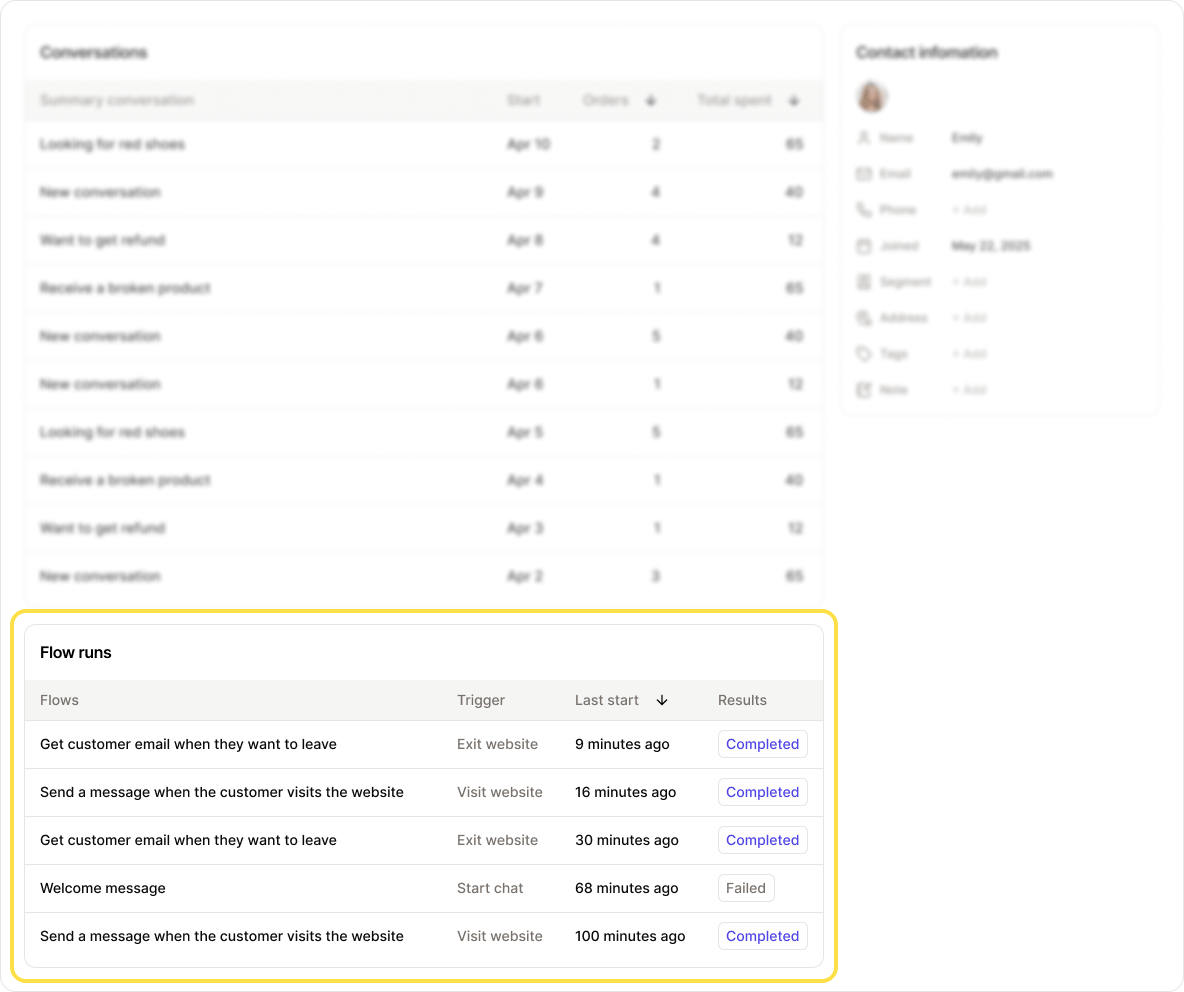 You can click on each flow to view detailed results, including:
* Which steps were completed
* Which actions were triggered
* Any conditions that were met or skipped
This helps you understand how automation is interacting with each customer and identify opportunities for optimization.
You can click on each flow to view detailed results, including:
* Which steps were completed
* Which actions were triggered
* Any conditions that were met or skipped
This helps you understand how automation is interacting with each customer and identify opportunities for optimization.