> ## Documentation Index
> Fetch the complete documentation index at: https://docs.neopal.ai/llms.txt
> Use this file to discover all available pages before exploring further.
# Quick start
> Get started with NeoPal in minute.
Follow these simple steps to activate NeoPal - AI Shopping Agent and start engaging with customers instantly.
Before you begin, make sure you already have a store on Shopify.
**Step 1**: Install NeoPall app
1. Go to the [Shopify App Store](https://apps.shopify.com/).
2. Click **Install app** and follow the prompts to grant permissions.
> *NeoPal will now appear in your Shopify admin under “Apps”.*
**Step 2**: Enable NeoPal Chat widget
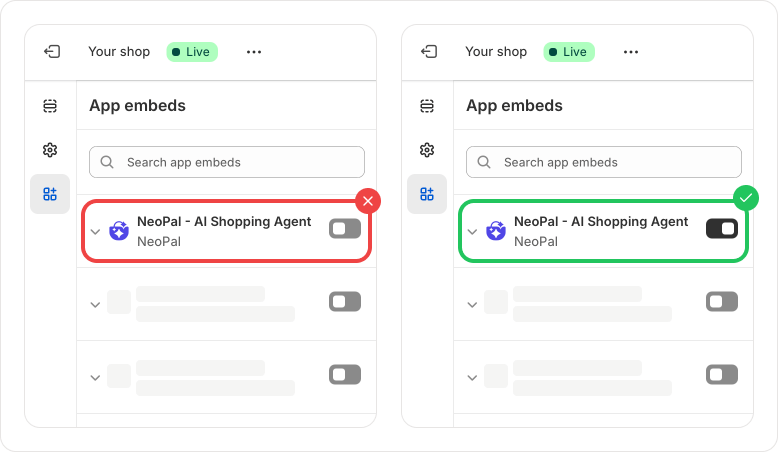 1. In your **Shopify Admin**, go to **Online Store** → **Themes**.
2. Click **Customize** to open the **Theme Editor**.
3. In the left sidebar, select **App Embeds**.
4. Find **NeoPal Chat** and toggle it **on**.
5. Click **Save** to apply the changes.
> 💬 *The NeoPal Chat widget is now live on your storefront!*
***
You’re all set! NeoPal is now ready to start helping your customers and boosting your sales.
1. In your **Shopify Admin**, go to **Online Store** → **Themes**.
2. Click **Customize** to open the **Theme Editor**.
3. In the left sidebar, select **App Embeds**.
4. Find **NeoPal Chat** and toggle it **on**.
5. Click **Save** to apply the changes.
> 💬 *The NeoPal Chat widget is now live on your storefront!*
***
You’re all set! NeoPal is now ready to start helping your customers and boosting your sales.